Enrolling in Medicare After Your Initial Enrollment Period Has Ended
Special Enrollment Period (SEP) Application
You will follow one of Four scenarios:
Scenario #1 - you already have Part A, and just need to add Part B
Submit up to 3 months prior to your requested start date
Just submit the two required forms (Form 40B and Form L564) to the Social Security Administration (SSA) to add Part B (see Forms to Complete section).
Follow the instructions further down in the Forms to Complete section & Submit Forms section, and as described in the video on how to complete and submit the two forms.
NOTE: SSA guidelines state you can submit this up to 3 months prior to your requested start date…when you’re submitting this while covered on a group health plan based on active employment. However, if you’re doing this in the 8 months after separating from your employer, then Part B must start the month after you submit the paperwork.
Scenario #2 - you Need BOTH Part A & Part B

Enroll in Medicare After Age 65 (NEW Process)
Submit up to 3 months prior to your requested start date
First start out with an online application for MEDICARE at www.ssa.gov.
On the application, you will be asked whether you want to enroll in Medicare Part B medical insurance. Say YES to Part B, and then select your Part B start date (up to 3 months in the future)
You will automatically get Part A (which will be backdated up to 6 months from the month you submit the application).
Then you will need to submit Form 40B & Form L564 to SSA (see Forms to Complete section & Submit Forms section further down).
Since you don’t have a Medicare # yet…on Form 40B, enter your SSN instead.
Scenario #3 - You Need Medicare & Social Security Benefits
Submit up to 3 months prior to your requested start date
Enroll In Social Security & Medicare At The Same Time (Updated)
First start out with an online application for Social Security RETIREMENT benefits at www.ssa.gov.
On the retirement application, you will be asked whether you want to enroll in Medicare Part B medical insurance. Say YES to Part B, and then select your Part B start date (up to 3 months in the future).
If you don’t have Part A yet, you will automatically get Part A (which will be backdated up to 6 months from the month you submit the application).
Then you will need to submit Form 40B and Form L564 to SSA (see Forms to Complete section & Submit Forms section further down).
If you don’t have Part A already…on Form 40B, enter your SSN in place of your Medicare #.
Scenario #4 - you Need Part A & Part B but don’t have 40 quarters paid into Medicare
Enroll by phone appointment (or in-person) up to 3 months prior to your requested start date
This enrollment is done through your spouse’s work record
You need to be married at least 1 year, your spouse needs to be at least age 62, and your spouse needs to have the 40 quarters.
This enrollment CANNOT be done online. You’ll need to schedule a phone or in-person appointment with Social Security. Call your local SSA office or the main number at 800-772-1213 to schedule. Just know, appointments are often scheduled 1-2 months out, so start calling 3-4 months prior to when you need Part B to start.
You’ll need to submit Form L564 to SSA (see Forms to Complete section & Submit Forms section further down). You can upload, mail, fax, or hand-deliver the forms to SSA.
Follow the instructions below and as described in the two videos about Form 40B and Form L564.
Follow the instructions in the SUBMIT FORMS section on the alternative ways to turn in the required paperwork.
FORMS TO COMPLETE
Application for Medicare Part B (Form 40B) — you complete this
How to Complete & Submit BOTH Form 40B & Form L564
EACH person enrolling in Medicare Part B needs to complete the form.
Regardless of how you submit, you must make note of when you want your Part B to start at the bottom of the form.
If you don’t have a Medicare Number yet, enter your SSN in its place on the form.
On Form 40B, make sure to match up the dates you enter on Section 2, #3 with the dates your employer enters in Section B of Form L564 (see that form below).
Request for Employment Information (Form L564) — your employer completes this
The employer who the existing insurance coverage is through will need to complete this for EACH person enrolling in Medicare after age 65…even the spouse who is also enrolling.
If you had more than one employer that provided group health insurance since turning 65, then you’ll need one of these forms for EACH employer.
SUBMIT FORMS
ways to submit the paperwork:
Upload Forms In Your Online SSA Account
Upload Documents In Your Social Security Account
This has now become the recommended route, as the documents are electronically submitted to your local SSA office for processing. Further down you’ll also see options for mailing, faxing, or hand-delivering the forms to SSA.
If you already have the forms completed, use the video link or images below to guide you on the upload process.
Once signed in to your SSA.gov account, you’ll see these options in the main dashboard (see below).
Step 1: Select "Upload Documents" in your main SSA dashboard

STEP 1
Step 2: Choose "SSA Form" as the type of document you will upload
Step 3: Select "CMS-40B" from the drop-bdown menu

STEP 2
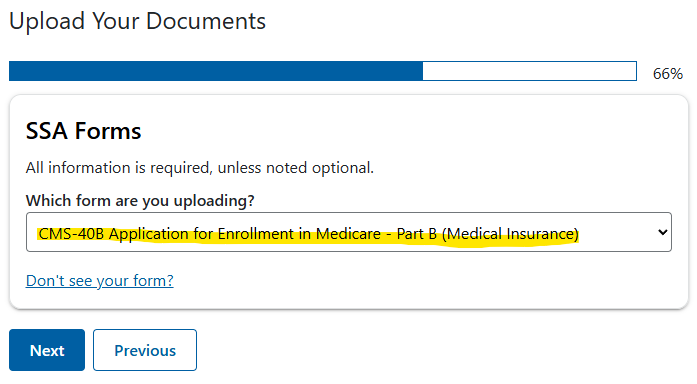
STEP 3
Step 4: Drag and drop or select the files you need to upload from your computer (for Special Enrollment Period applications, you will also upload Form L564 here)
Step 5: Review and submit the information to SSA -- You will see a confirmation screen right after this step is complete
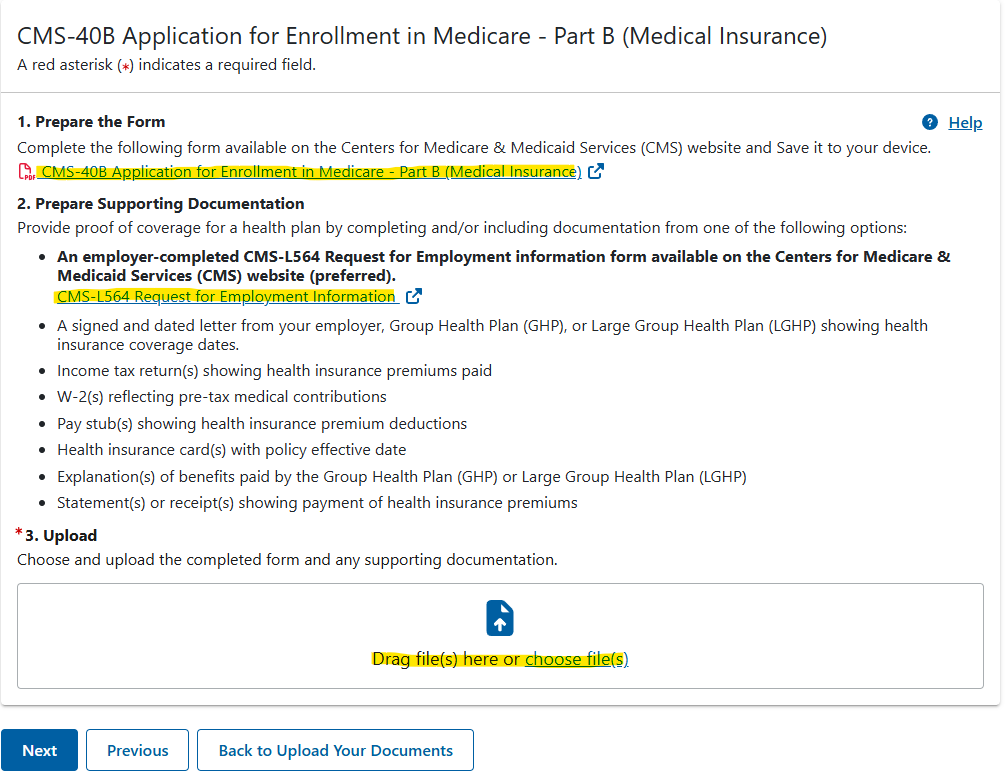
STEP 4
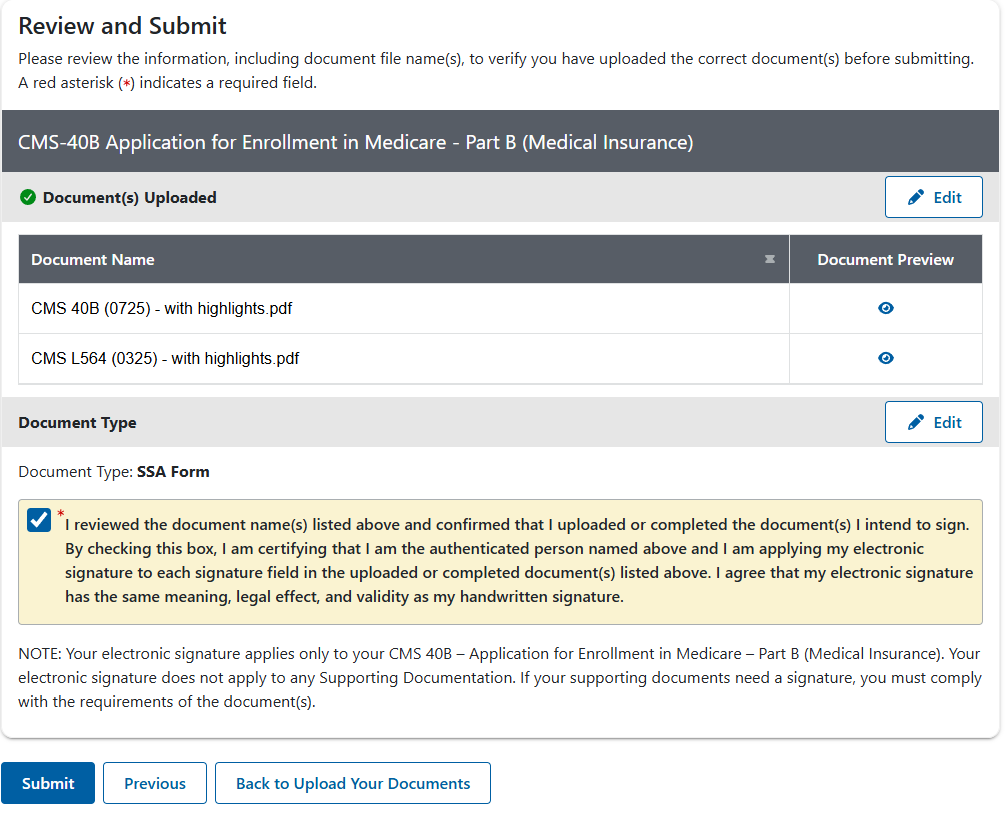
STEP 5
Submit In-Person, by Mail, or Fax
In this case, you need to submit the forms to a local Social Security office.
The SSA Office Search button below allows you to obtain the address, phone, and fax # for your local office.
The “Walk-In” option at your local SSA office is now limited to DIRE situations. But each SSA office applies this differently. This would be for those with disabilities, veterans with dire need for expedited services, homeless people with no phone or internet — and sometimes if you’re about to lose health insurance within the next week and need Medicare Part B to start the 1st of the next month.
Make a copy first for your records, as sometimes SSA loses paperwork you give them. Most offices are open Monday through Friday from 9:00am to 4:00pm. If possible, have them process the paperwork right there in your presence with a SSA rep at the service window. Typically, the approval will show up online in your SSA account within a few days.If you fax the forms, include a cover letter and make note of how many pages are in the fax. Processing time can vary depending on the SSA office and the time of year. Expect anywhere from 2-5 weeks for processing.
If you used the SSA office search link to get your local SSA office’s direct fax #, this would be the preferred # to fax to.
Or you can fax directly to the SSA National Fax # at 833-914-2016, but processing time is usually longer.
SSA offices have a Drop Box to leave important paperwork to be processed. Make a copy first for your records, and then leave the paperwork in an enclosed envelope. Processing time can vary depending on the SSA office and the time of year. Expect anywhere from 2-5 weeks.
If you mail the forms, make a copy first for your records and then send via USPS Priority Mail, which provides delivery confirmation. Processing time can vary depending on the SSA office and the time of year. Expect at least a few weeks, possibly longer.
(see next section below on how to confirm your application status online)
MEDICARE CARD & PART B CONFIRMATION

Depending on the timing of your request, you should receive a letter in the mail in 2-6 weeks with confirmation that the enrollment has been completed for your requested effective date. And your updated Medicare card will arrive soon after.
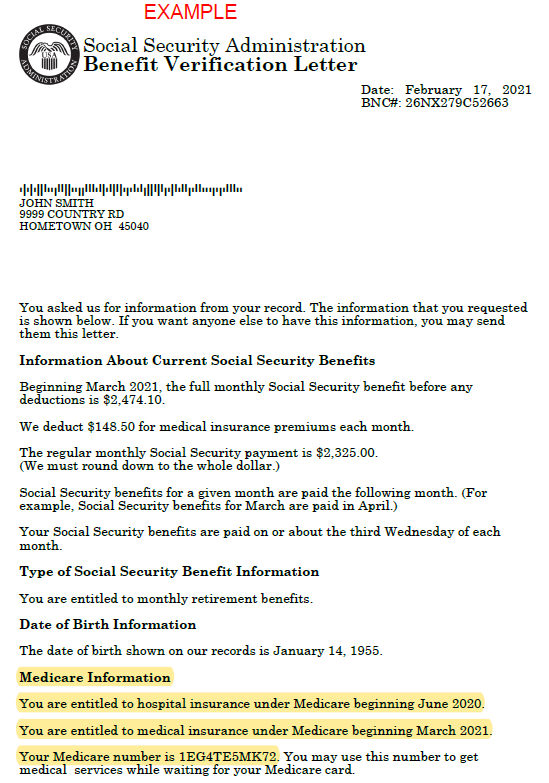
You can get confirmation sooner by accessing your Benefit Verification Letter when logged in to your My Social Security online account at www.ssa.gov. Your Medicare Number and start dates will be summarized in the Medicare Information section of this letter. The location of the Benefit Verification Letter is different depending on whether you’re also receiving Social Security benefits.
Your SSA account dashboard will look like this...
when you’re receiving BOTH Medicare & Social Security benefits:
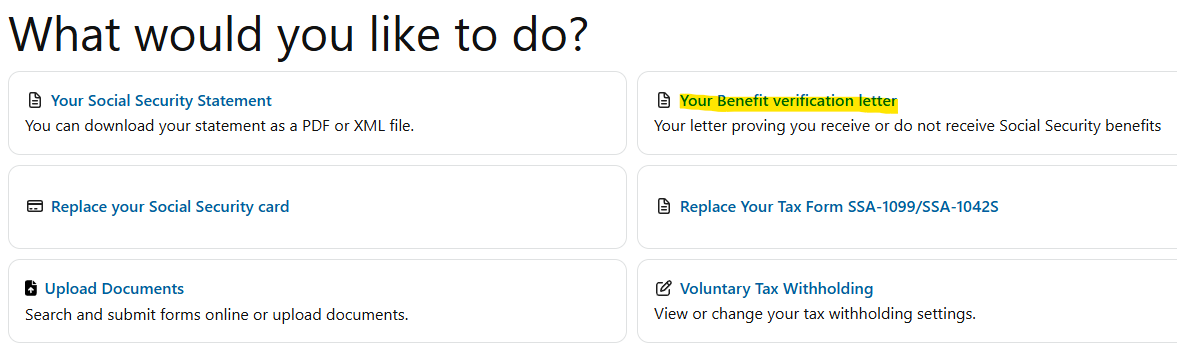
when you’re receiving ONLY Medicare (NOT Social Security):

Benefit Verification Letter (example)
Below is an example of the Benefit Verification Letter for someone on Medicare AND Social Security Retirement benefits.
Notice the Medicare Information section shows the Part A (hospital) and Part B (medical) start dates, as well as the Medicare #. See the highlighted spots at the bottom.