
How to Get Proof of Medicare Coverage
(Benefit Verification Letter)

Video: How to Get Proof of Medicare Coverage
When you need proof that your Medicare coverage is active, but don’t have your Medicare card yet, you’ll want to access your Benefit Verification Letter online at www.ssa.gov.
The Benefit Verification Letter shows if you’re receiving Social Security benefits, but ALSO confirms your Medicare coverage.
The letter will display your Part A hospital insurance start date, Part B medical insurance start date (if you enrolled), as well as your unique Medicare number.
Let’s take a look at how you can access the Benefit Verification in a few easy steps:
My Social Security Account (ssa.gov)
Step #1: Login to your account at ssa.gov
Step #2: Click on the “Your Benefit Verification Letter” link on your main account dashboard.


Step #3: Click the Adobe PDF link to download and view a copy of the letter.
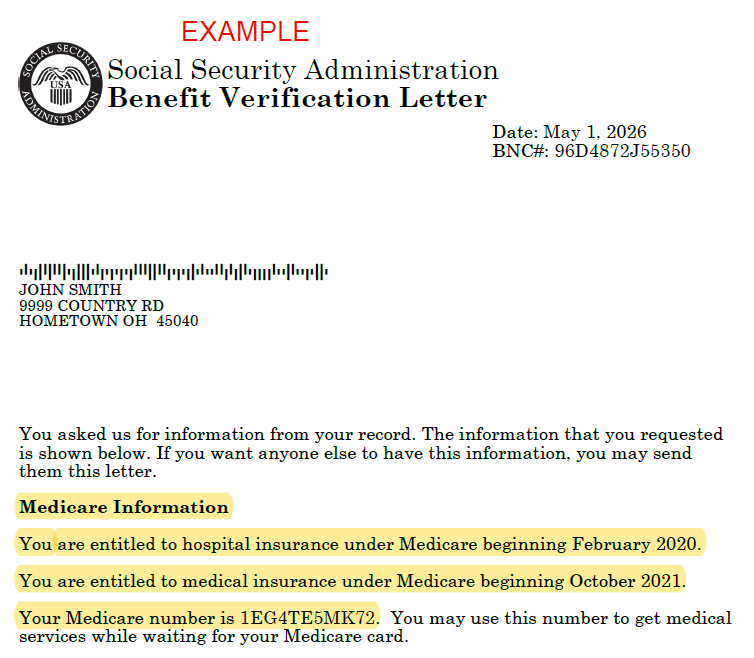
Step #4: Locate the Medicare Information section of the letter (see highlighted spot at the bottom of the image). If you’re receiving Social Security benefits, this will also be shown on the letter.
Note: The BNC# at the top-right is NOT your Medicare #.
Depending on whether you have Part A only, or Part A & Part B…there are three important spots on the letter to look for:
Hospital insurance is Part A
Medical insurance is Part B
Medicare number
Start dates for Parts A & B are always the 1st of the month referenced.
This letter is proof of Medicare coverage, so you can use it while you’re waiting for your Medicare card to arrive by mail.
Below is an enlargement of the Medicare Information you see in the letter.


